
Velloo documentation
Markdown for LLMs ↗What's new
Velloo 0.9.0 splits an agent's tools into reads and changes, so you can let it look without asking and still approve every edit, and refuses an agent's write that would undo an edit you made on the canvas.
Velloo 0.9.0
This minor release separates what an agent reads from what it changes, so you can let it look at your design without being asked and still approve every change. An agent can no longer overwrite an edit you made on the canvas after it last read the screen.
Designs are unchanged: 0.9.0 and 0.8.0 open each other’s designs, and shares need no republish. Anything that scripts the guided MCP surface needs one change. See Upgrade.
Reads and changes are separate tools
The guided MCP surface now has four tools:
read_vellooruns an operation that only reads: the design, a render, a comparison, the code it emits. It is marked read-only.call_vellooruns every operation that changes the design.run_velloo_planandoperation_schemaare unchanged. A plan can mix reads and changes.
One tool that did both was, by MCP’s rules, a tool that changes things, so a client asked the same permission for a screenshot as for deleting a screen. Now you can allow read_velloo in your agent’s permission settings while keeping approval for tools that change the design. The exact settings depend on your agent.
An operation sent to the wrong tool is refused with the call that takes it. In our evals, agents sent every read to read_velloo from their first call.
In Claude Code, read_velloo, call_velloo and run_velloo_plan now load at the start of a session. Claude Code keeps MCP tools behind its tool search until an agent looks for them, so every session used to spend a search before its first Velloo call, and only then saw the arguments listed in the tools’ descriptions. operation_schema stays behind the search. In an eval, Sonnet 5.5 recreated a page in two fewer steps and at about 40% less cost.
Your canvas edits survive an agent’s rewrite
An agent rewrites a screen from what it last read. If you edited that screen on the canvas in between, its rewrite used to put back what it had read, and your edit was gone. Undo could not bring it back either, because an agent’s writes stay off the canvas’s undo stack.
Now that rewrite is refused with ScreenChangedSinceRead, and nothing is written. The error names the nodes that changed and the get_screen call that brings the agent up to date, so it reads your edit and makes its change on top of it.
- The agent sends nothing extra. Velloo knows which session last read the screen and what it saw.
- A rewrite of one node is refused only when the change is inside that node. An edit elsewhere on the screen does not block it.
- An agent’s own writes never count against it, and a session that has not read the screen yet has its first rewrite let through.
- It covers an edit on the canvas, a change to the file on disk, and a write from another agent session, for
compose { mode: "replace" }andset_screen_tree.
Snippets take nodes the way screens do
- Snippets can use your app’s components. A component passed into a snippet now renders correctly instead of stopping the preview with an “Unknown component” error.
- Snippet previews match what you place. Text and groups of elements work as expected, and invalid content is caught when you place the snippet, before it can break the screen’s preview.
- Editing snippet content keeps components intact. The canvas inspector no longer turns a component into raw text when you edit it. Incomplete edits are highlighted and only applied once valid.
Fixes from the release evals
We tested this release across 42 sessions with Claude Code and Codex. The fixes include:
- Theme imports preserve text colors. Importing a background color no longer removes its existing text color when your stylesheet leaves that color unspecified.
- Component checks recognize renamed components. Setup no longer reports a missing library component when your app provides it under a different name.
- Agents get clearer help finding elements. When an agent confuses an HTML ID with Velloo’s own ID, the error points to the matching element and explains how to address it.
Upgrade
From your application checkout, run:
velloo upgradeExisting designs keep schema version 4 and open as before, in both directions. Shares are unchanged.
- Scripts that call the guided surface send read operations through
read_velloo. A read sent tocall_velloois refused, with the call that takes it.run_velloo_plantakes both. - Permission rules written for
mcp__velloo__call_velloonow cover changes only. Addmcp__velloo__read_vellooto allow reads. - Agent configuration needs no change: the server is the same, and the client lists the new tool at its next session.
Velloo 0.8.0
This minor release lets a board say how its screens connect, makes a new design match your app before the first design task, and gives the design language a place on the canvas. Agents write and read screens as the JSX your app would hold.
A design saved by 0.8.0 can hold arrows, frames that follow their screen’s height, and props that hold a component type. 0.7.0 opens such a design, but drops the first two the next time it writes that board and can’t render the third. Upgrade everywhere a design is edited. See Upgrade.
A board can be a flow
Draw arrows between frames and a board becomes a flow: a sign-up, a checkout, a subscription change. You review it on the canvas, and your agent implements from it.
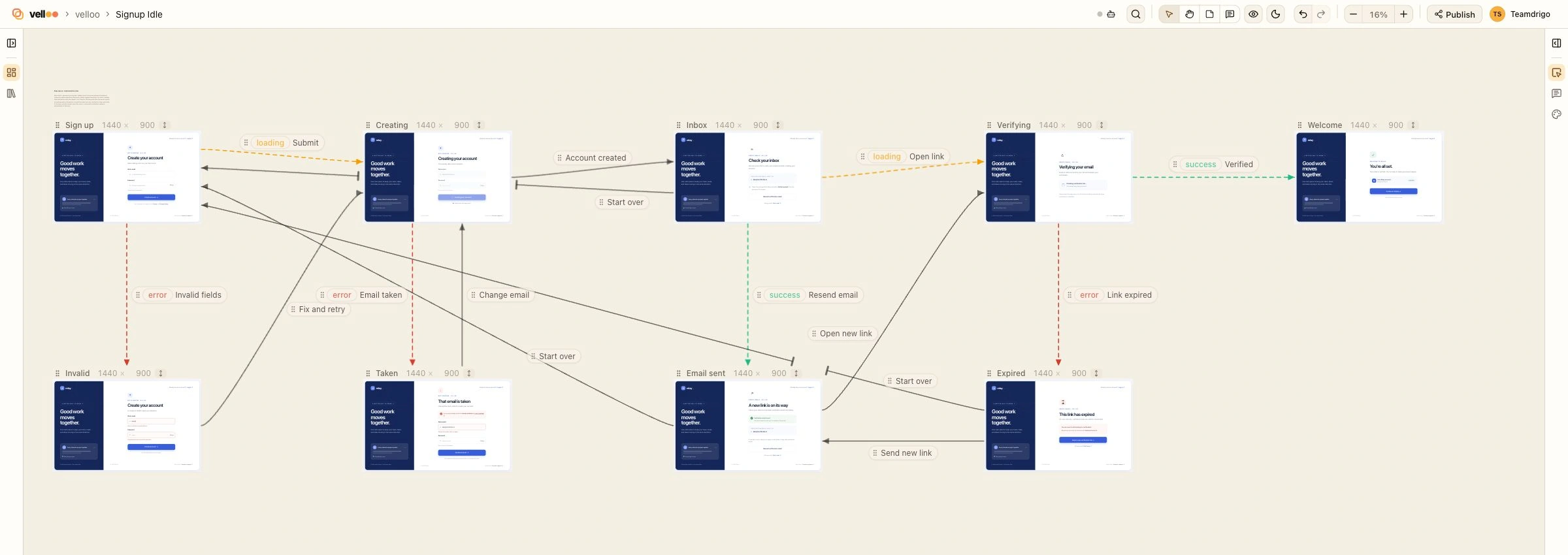
An arrow says one of two things:
- A transition is solid. From this step, what its label says happens, and the person is on the next step.
- A state is dashed and tinted. The frame it points at is the same step in that state:
loading,empty,error,success, or a short name of your own. States are separate screens, and the arrows are what group them into a step.
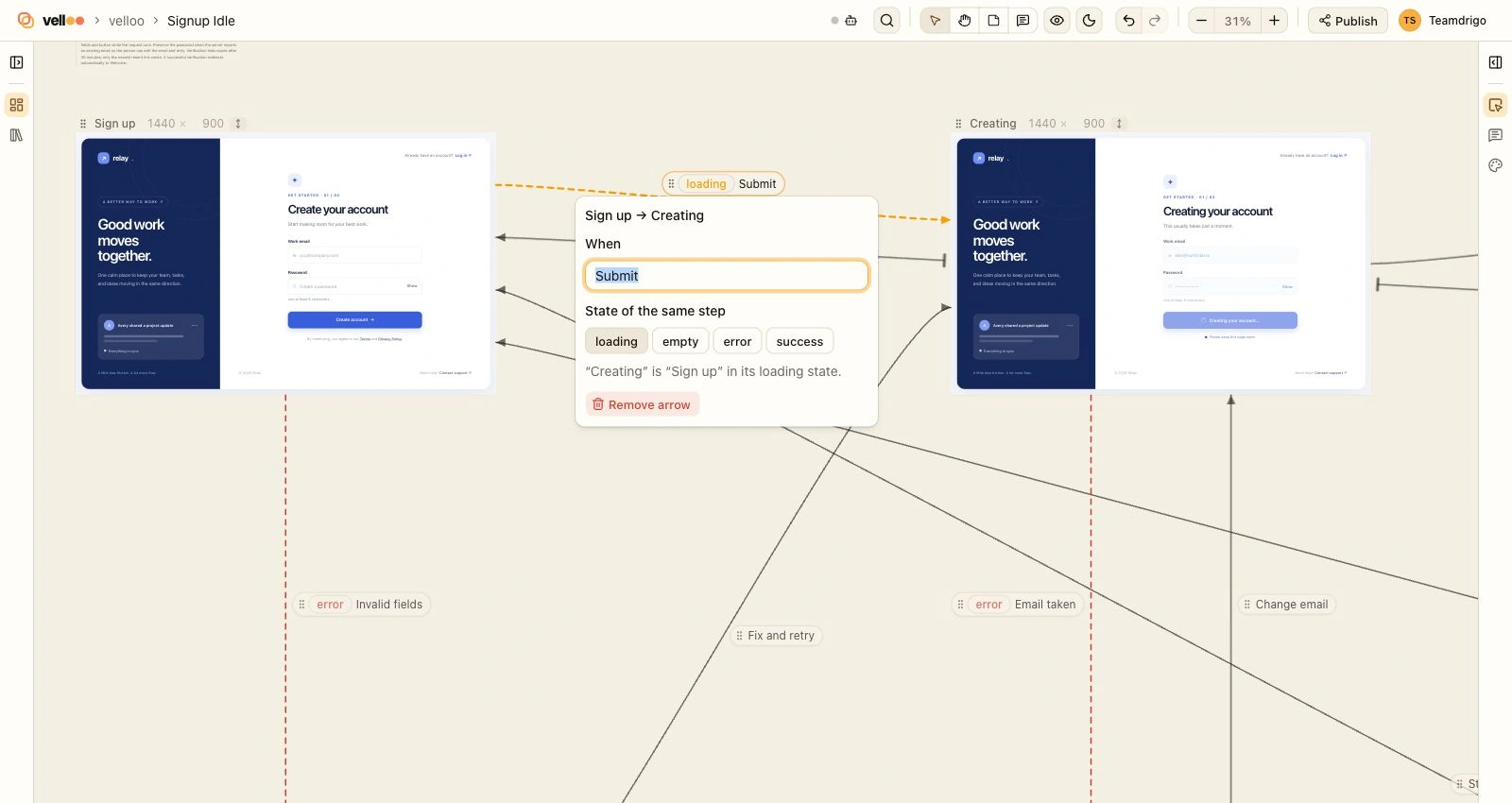
On the canvas:
- Drag the dot on a frame’s right edge onto another frame. The arrow’s editor opens for its label. Click an arrow or its label to relabel it, pick a state, or remove it.
- Arrows stay off your screens. An arrow that would cross a frame it does not belong to stops short of it with a bar and resumes on the far side. Arrows that meet the same side of a frame are spread along it.
- Labels slide. Each label has a grip that moves it along its arrow. Labels and arrowheads hold their size at any zoom.
- Arrows follow a frame as you drag it, hide with the rest of the markup, and undo with the board. Removing a frame or its screen removes its arrows.
For your agent:
connect_framesdraws, relabels, and erases arrows in one call. Its result names the frames no arrow touches and the gaps the drawing still leaves. A flow drawn with no state at all is asked, once, whether its steps that wait on something need loading and error screens.get_boardcarriesflowwhenever the board has arrows: the steps with their states and when each occurs, the transitions, where the flow starts and ends, andgaps. One gap is reported without knowing your product: a step that has a loading state and no error state.mode: "flow"returns the flow alone.- Arrows are a spec. Nothing runs on the canvas, and
emit_codeemits nothing for them. The flow tells the agent which screens are routes and which are states of one route. compare_to_urlcompares a state with its implementation. A design with a password field of its own is no longer called an auth wall, and a design that is itself a loading state no longer reads as a page that never finished loading.
A published share draws the same arrows, read-only. Republish a board to show them.
Set up first
A design made by velloo init used to open on the starter’s fonts and palette, and nothing had checked that your components render on the canvas. Setting a design up for its app is now the first step after init. Ask your agent to “set Velloo up for my app”, or run /velloo:setup in Claude Code or Gemini CLI.
Setup imports your app’s theme and fonts, gets your components rendering through the preview entry, checks every one of them, and proposes a design language for you to review.
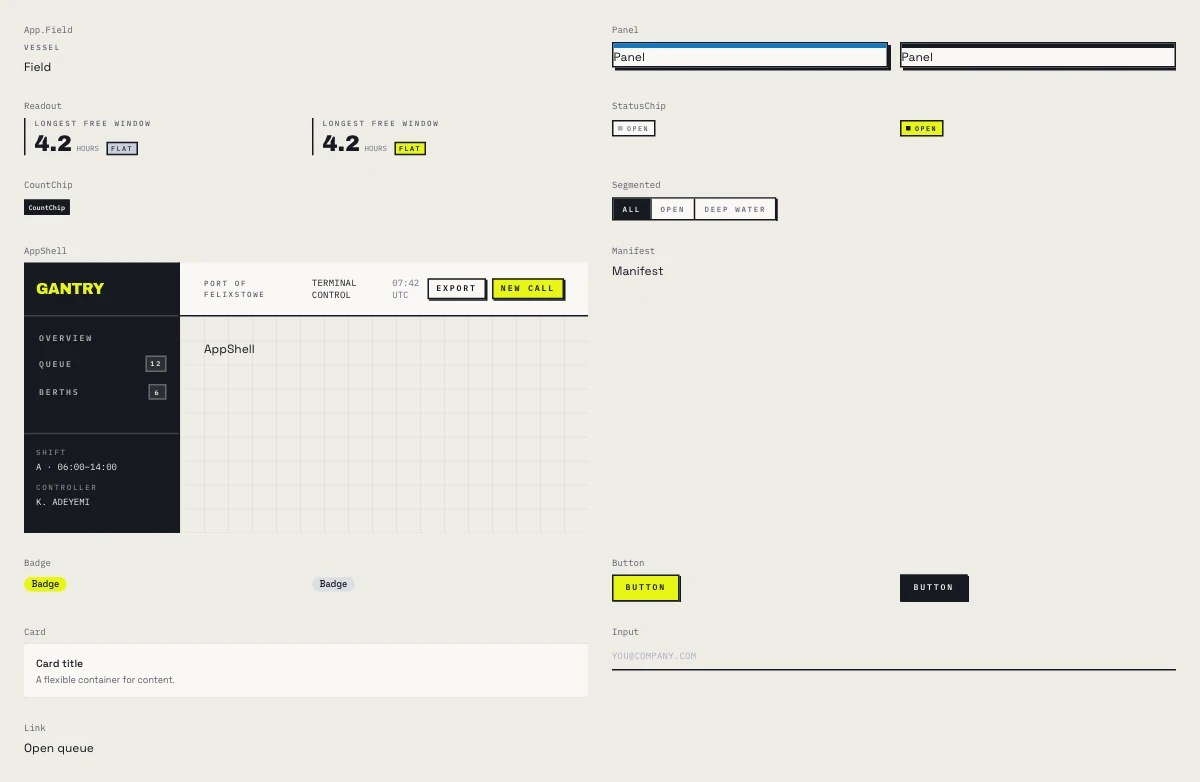
check_components shows an agent: an app’s own components in one render, at the props its code passes them. A component with a variant is mounted twice.check_componentsmounts every component your app gives a design in one render, at the props a call site passes, and judges what the browser drew. It reports a component that drew nothing (blank), nearly nothing (thin), or the same picture for two variants (variantsIdentical: a stylesheet or theme color that never reached the canvas). What it cannot judge isinconclusive, with the reason.- The preview entry suggestion works as written. It is your app’s own entry rewritten for a canvas: the provider nesting order kept, an in-memory router, a query client, auth providers left out.
set_preview_entry {}writes it. - The catalog says what a component is for.
list_componentscarries the doc comment above each component, counts icons instead of listing them, and lists a module once however your code spells its import path.
velloo init also reads from your app what it used to ask:
- Fonts, palette, and Tailwind config. A family that
next/fontsets at runtime is traced to its loader call and set with its weights. A stylesheet that only@imports the file holding your tokens is followed to that file. - A Mantine theme.
createTheme, a typedMantineThemeOverride, or a theme inline on the provider is read wherever your app keeps it, with what it leaves unsaid filled from Mantine’s own defaults, light and dark. - The library. An app with no UI library gets a no-library design, styled with Tailwind when the app has it. It is never given shadcn. The library is a question only when there is no app to read. The welcome sample uses the app’s library too, and shadcn when the app has none.
- Where the theme came from. The design records it as
themeSource: a stylesheet, a Mantine or MUI theme module, the library’s defaults, or a preset. An agent on an app themed in JavaScript is told to compareget_themewith that file instead of importing a stylesheet, andimport_themeon a stylesheet with no tokens is now an empty import with a note, not an error. - An MUI theme is found where it is, inline in an entry module too, and a theme that names no font no longer opens on the starter’s fonts.
- Where your components are. The components-folder prompt is gone.
An app in a subfolder of the directory you run init in, such as web/ in a repository with no package.json of its own, gets the same closing steps and README.
A design language you can see
The canvas has a design-language stage: color, type, shape, and the rules in words, set beside a specimen of your design’s own components. Open it from the Theme rail.
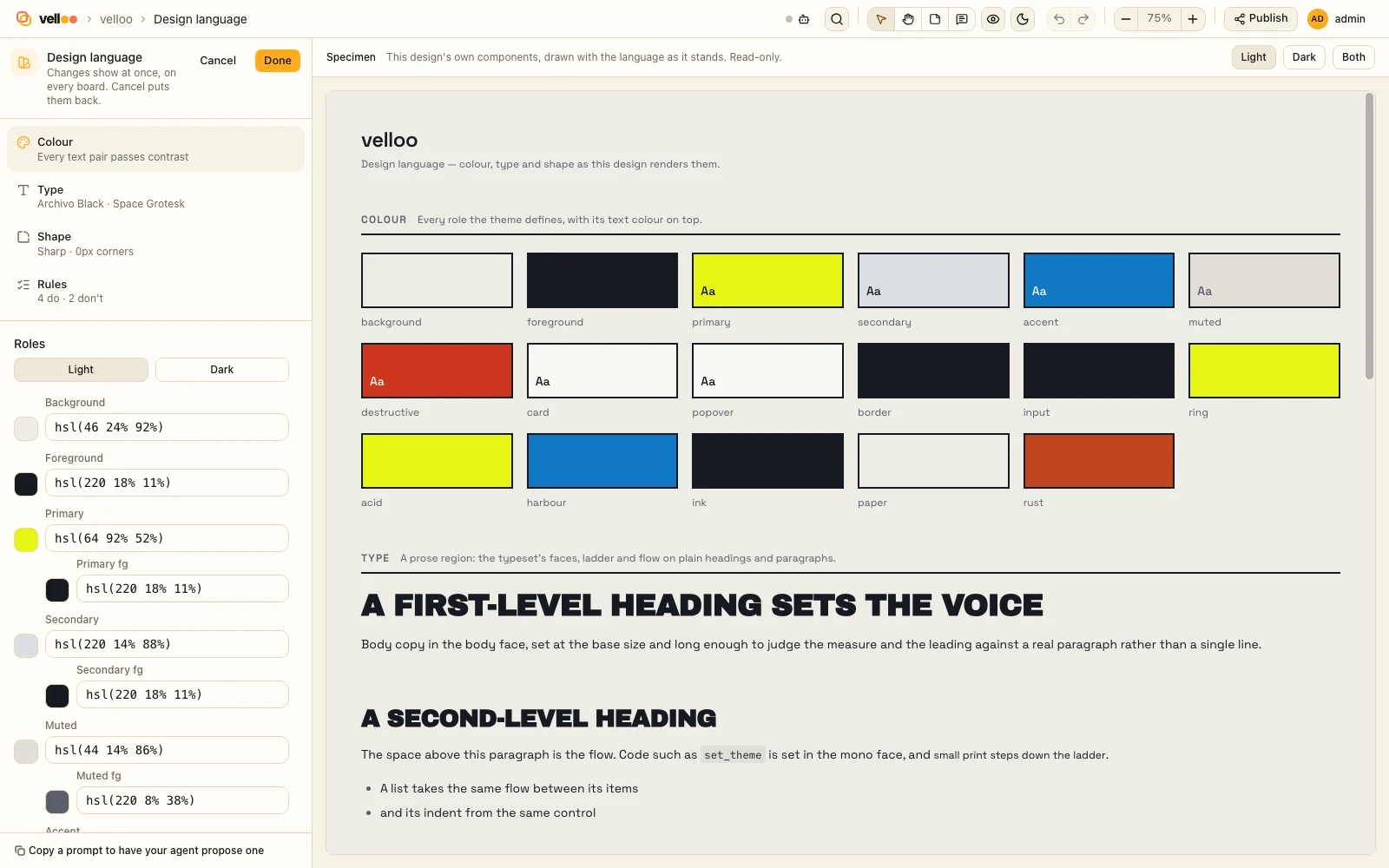
- Your agent proposes, you refine. Reading an existing app’s language needs an agent, so
set_design_languagewrites what a design is going for and its do’s and don’ts, and you adjust them on the stage. Starting fresh needs no agent. - Guided the first time, review afterwards. A first definition is four steps: color, type, shape, rules. An existing language is laid out to move around in.
- Edits are live, and Cancel puts them back. The specimen and every board follow as you change a color or a typeface. Your browser’s Back button cancels too.
- Rules live in the document the design follows. That is the design’s own
guidance.md. ADESIGN.mdin your repo is shown read-only and never written. - Themes have names. Name a new theme in a dialog (“Night Shift”), define it in the guided steps, and the board moves to it when you choose Done. The stage edits the theme the board on screen uses.
The Theme rail and the stage now share one set of controls. The color-named preset gallery is gone from the canvas; presets remain for set_theme { from } and velloo init --themePreset.
Compose the JSX your app already holds
composereads JSX as you would write it for the app.constdata above the markup,.map,cond && <X />,cn(...), small components defined in the source, or a whole page module with the app files it imports. It is parsed and evaluated as data; nothing executes.filereads a page straight from your app, inside the layouts it renders in.- A prop can hold a component type. Mantine’s
<AppShell.Section grow component={ScrollArea}>and MUI’scomponent={Link}compose as written: the design stores the component, the canvas renders it, andemit_codewritescomponent={ScrollArea}with its import. A page read out of a Mantine app no longer stops at its navbar. - An imported tag is the component its import names.
Stackfrom@mantine/coreis Mantine’s, not Velloo’s primitive of the same name, so a page composed from its own file matches the page. - State hooks are read at their first value.
useState("")is its argument, and so are Mantine’suseDisclosure,useToggle,useInputState, anduseCounter. An app shell that opens withuseDisclosure()composes as written. get_screen { mode: "jsx" }prints a screen back in the same form, with lists folded, to edit and send again.emit_codeemits a list as a list. Three or more look-alike siblings become one.mapover the values that differ, which shortens the emitted JSX by about a quarter on list-heavy screens.classesUsedis returned only when asked for.- An icon the design never sized is emitted with
size={16}, which is how the canvas draws it.
Frames that follow their screen
A frame can be as tall as its screen. Every frame Velloo places has fit: "content": when the screen changes, whoever changed it, the frame is measured again and resized. The frame menu has Fit height to content, and setting a height by hand ends it. screenshot and compare_to_url no longer report those frames as too short.
Theme import fixes
- A stylesheet that states only
--radiusreplaces the corner scale. A square app used to be drawn with rounded cards, because the starter’s larger steps survived the import. - Corner radius reaches Tailwind screens. A theme now emits
--radius-smthrough--radius-xl. import_themesays what it left out.notImportedlists what your app states that did not reach the theme, each with its reason.fontssays which families were set and from where, andimportedStylesheetsnames the sheets it followed.- A monorepo root finds the workspace’s packages. A design recorded at a repository root now mounts components whose React is installed only in a workspace below it, when the workspaces agree on one copy.
velloo design set-app-rootkeeps paths that already name the right files when it narrows a root to a workspace, and rewrites the root-relative ones.
Canvas fixes
- The preset chips under a frame, and the frame menu’s “New frame of this screen”, offer the design’s own viewport presets.
- Going to a comment, note, or annotation keeps the node’s box, pin, and note marker on the node, and centers it. Selecting a node again after deselecting it brings its box back.
Smaller MCP papercuts
- More arguments are read the way agents write them: one arrow sent flat to
connect_frames,update_board { boardId, name },update_frame { height },find_nodes { type },set_design_language { description, rules }with rules as sentences,add_notewithout a board or coordinates,remove_frame { frameId }without its board, andlist_notes {}orlist_annotations {}across the whole design. - An unknown
colors.<name>inset_themeis a palette color. A name one edit from a real slot is still refused. emit_codeno longer fails on a screen that holds an empty prop, such asrightSection={open ? <Chevron /> : null}.- A
composethat is refused no longer leaves an empty screen and frame behind, and a new screen can bereviews-v2besidereviews-v1, orhome_focus. check_componentsandpreview_statusname the syntax error when the preview entry does not compile.- A frame’s
groupnames a frame region by id or name, and a new name creates it. It used to be stored as given, under an id no group defined. - A screen’s diagnostics are sent once, then only when they change.
- An app with no components of its own, only pages and a router, is no longer told to set up a preview entry.
- The first screen of instructions an agent sees is ordered by importance, and the rest arrives with its first result. Some clients cut a server’s instructions short without saying so.
Upgrade
From your application checkout, run:
velloo upgradeExisting designs keep schema version 4 and open as before. Arrows and fit are new optional fields: a board without them is unchanged, and 0.7.0 drops them when it writes a board that has them. Upgrade every machine that edits the design before you draw a flow.
A prop that holds a component type is new in 0.8.0. A design that has one needs 0.8.0 wherever it is rendered, and a share needs to be republished.
Things to look at in existing designs:
- Corner radius on Tailwind designs. A theme that states only a base radius other than
0.5remrounds differently than before. Re-importing a stylesheet that states--radiusdrops the scale’s other steps, including ones set by hand; the dry run lists them. velloo initin an app with no UI library makes a no-library design where it used to default to shadcn.--librarystill chooses explicitly.- Theme names are kept as typed: either case, digits, spaces,
-, and_. A name must be unique without regard to case. classesUsedis no longer in everyemit_coderesult. Ask for it if a script reads it.
Shares published before 0.8.0 are unchanged. Republish a board to show its arrows.
Velloo 0.7.0
This minor release makes a published share look exactly like the canvas it came from, lets text sit beside elements as plain text, and gives compare_to_url the tools to compare real pages. A round of fixes follows from running Claude Code, Codex, and Cursor against real apps.
A design saved by 0.7.0 can contain text nodes, which 0.6.0 cannot open. Upgrade everywhere a design is opened. See Upgrade.
A share that matches the canvas
A share used to draw a labelled frame where each of your app’s components was, and left your app’s CSS out. Reviewers were commenting on a different picture from the one on your canvas.
- Your components and your CSS travel with the share. Publish ships the app’s own stylesheet and, for every screen the canvas mounts, the markup it mounted to, for each theme and color scheme. Velloo Cloud never runs your app’s code; it shows what your canvas drew.
- No-CSS-framework designs match too. A share of a design with no component library and no CSS framework is drawn with the same inline-styled components as the canvas, so default buttons, cards, and text keep their styling.
- Fonts and images named only in custom CSS are sent. A self-hosted font or a background image referenced from
theme/custom.cssnow reaches the share. WOFF, TrueType, and OpenType fonts are accepted alongside WOFF2. velloo publish <design> --to <dir>writes the bundle to a directory with no account and no network, for checking what a share will contain.
Text beside an element is text
{ "$text": "…" } is a new node kind: a run of text sitting next to elements, as in Remote <a>Apply</a>. It renders as bare text with no wrapper element, so a rule in your app’s stylesheet such as .jobs li span no longer catches loose text. A bare string in a children array, or in compose JSX, becomes a text node. Text nodes are selectable and editable on the canvas.
- A
Textinside aTextis a run of its paragraph. It renders a<span>and inherits the line’s size, weight, and color unless it names avariantof its own. Before, it nested a paragraph in a paragraph, which screenshots and comparisons laid out as separate lines. - A string or number snippet param in a
childrenarray is its text. That write used to be accepted and then fail the next screenshot. - A new diagnostic,
render/paragraph-nesting, reports a block element written inside a paragraph, at the node’s path.
Compare real pages
source.hidetakes CSS selectors to remove from the live page before it is captured: a consent banner, a chat launcher, a promo bar the design leaves out. The result’shiddencounts what each selector removed.textDifflists the copy the page and the design disagree on, which a pixel score cannot register:changedpairs the two wordings and names the node,missingandextraare text on one side only.- Full-page captures scroll first, so scroll-reveal sections and lazy images are in the picture.
scroll: falseopts out, andscrollTruncatedreports a page that kept growing. - A capture whose component mount did not take says so (
render/server-fallback) instead of being scored as if it had. - Captures no longer include the canvas’s own scroll thumb, which was painted into screenshots, exports, and comparisons of any screen taller than its viewport.
Your app’s components, in more places
- Every rendered document carries your app’s global CSS, not only the canvas mount. A standalone HTML export draws your app’s real components instead of stand-ins.
composewrites your component for a bare name.<Text fw={700}>in a Mantine app names Velloo’sTextbut passes props only Mantine’s takes. 0.6.0 refused that write. Now, when exactly one of your app’s components of that name takes those props,composewrites that component and lists what it read underappComponents.read. It still refuses when two of them could be meant.- A heavy screen stays mounted. A canvas bundle over its size budget is now a warning; it used to drop every component on the screen back to a labelled frame.
- Canvas bundles are smaller. A Mantine screen went from 6.3 MB to 1.1 MB, and a shadcn screen using
lucide-reactfrom 1.0 MB to 0.5 MB. - Apps with no
node_modulesare left alone. In a static site, a Flask app, or a fresh clone, Velloo could download packages it was only probing for and style the design with a library the app does not use. It no longer installs anything.
Screens that reach the canvas
A screen is only on the canvas, and in a share, once a board has a frame for it. add_screen now says so in its result, screenshot and compare_to_url carry notOnBoard until a frame exists, and a publish with nothing to share names the screens no board places.
Smaller MCP papercuts
- More arguments are read the way agents write them:
set_preview_entry { code },find_nodes { component },component_status { components }or a singleid,import_theme { source }, a role-to-family map forset_theme’sfonts,batch { operations }, andupdate_framewithout aboardIdwhen one board holds the frames. - A wrong guide address is answered with the list of guides, and
velloo://guidereads as an index. import_themeon an app themed in JavaScript (Mantine, MUI, Chakra UI, antd) points atset_themeinstead of describing what shadcn expects.composekeeps the space at the edge of an inline element and accepts SVG’s camelCase elements and attributes (linearGradient,preserveAspectRatio).- An element’s own attributes (
href,src,alt) no longer raise prop warnings. update_noteandremove_noterun insidebatch.import_assetskeeps directories withroot, andlist_assetsrecurses.- Screenshots retry Chromium’s occasional “Unable to capture screenshot” once, on every capture path.
velloo connectsays which settings file it edits.
Upgrade
From your application checkout, run:
velloo upgradeExisting designs keep schema version 4 and open as before. Once 0.7.0 writes a text node into a design, 0.6.0 refuses to open that screen, so upgrade every machine and CI job that opens the design before you commit changes made with 0.7.0.
Two things to look at in existing designs:
- A
Textthat wraps otherTextnodes now runs them together on one line. If you used the outer one as a container for stacked paragraphs, change it to aBox. - A nested
Textthat relied on the default body size now takes its paragraph’s size.
Shares published before 0.7.0 are unchanged. Republish a design to get a share that matches the canvas.
Older releases
Velloo 0.6.0 and earlier are in the release archive.