
Velloo documentation
Markdown for LLMs ↗Flows
Arrows between frames turn a board into a flow. Transitions move between steps, states group the loading, empty, and error versions of one step, and an agent reads the result as a spec to implement.
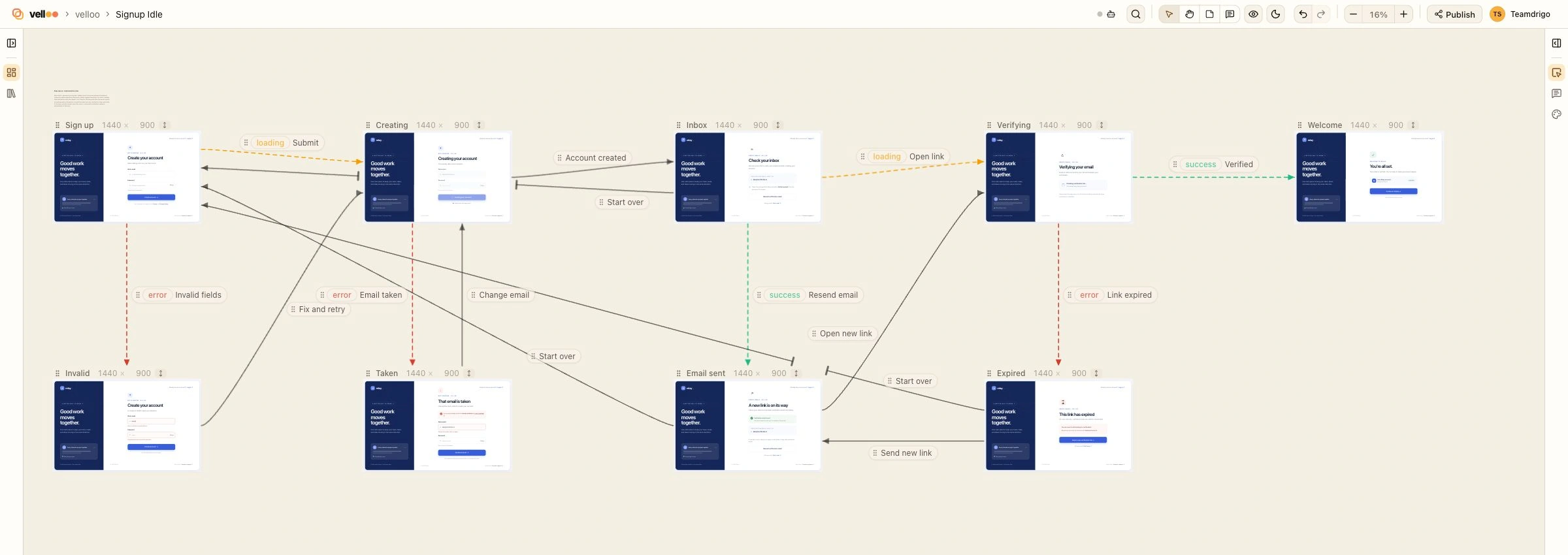
A board can say how its screens connect. Draw arrows between its frames and the board becomes a flow: a sign-up, a checkout, a subscription change. You review it on the canvas, and your agent reads it as a spec to implement from.
What an arrow is
An arrow joins two frames on the same board. It has a direction, an optional label in plain words, and an optional state. A board holds one arrow per ordered pair of frames, so the pair is the arrow’s identity: there is no arrow id, and drawing the same pair again edits the arrow that is there.
An arrow says one of two things, and state is what tells them apart:
- A transition has no state. From this step, the label happens (“Submit”, “Skip for now”) and the person is on the frame the arrow points at.
- A state has one. The frame the arrow points at is the same step as the frame it leaves, in that state, and the label says when (“Email already taken”).
The conventional states are loading, empty, error, and success. Any short name works, so “offline” or “expired” need nothing special.
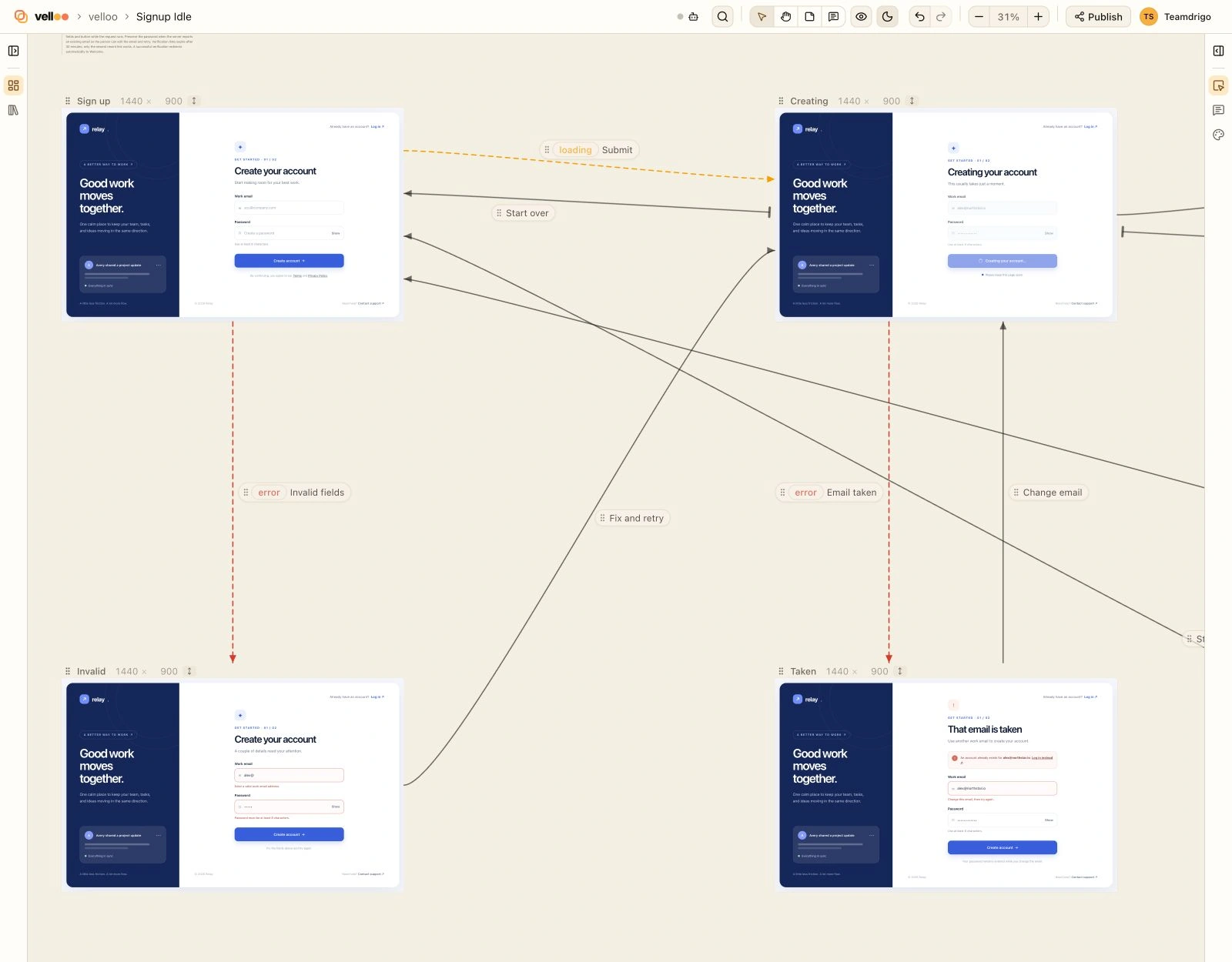
loading and error lead to states of the form; the solid arrows are transitions, here the ways back to it.States are screens, grouped into a step
A screen has one tree, and a different layout is a different screen. The loading, empty, and error versions of a step are therefore separate screens in separate frames. The state arrows between them are what make them one step, so a frame carries no state of its own.
The frame a step’s state arrows start from is its default. States chain: form → loading → error reads as “it was sent, then it failed”. A frame is one state of one step, and a step’s states can’t loop.
Two rules keep steps and states apart:
- The next screen is another step. Wherever success leads, the screen a person lands on next is a new step. Leave the state off that arrow.
- A way back is a transition. “Try again” from the error back to the form, or “Edit email” back to the start, leads back into its own step and carries no state.
A state is the same place in the app as its step: one route, one component, several things it can show.
Draw a flow on the canvas
- Draw an arrow. Drag the dot on a frame’s right edge onto another frame. The arrow’s editor opens for its label.
- Edit an arrow. Click the arrow or its label to change the label, pick a state, or remove the arrow.
- Move a label. Each label has a grip that slides it along its arrow, out of the way of a frame or another label.
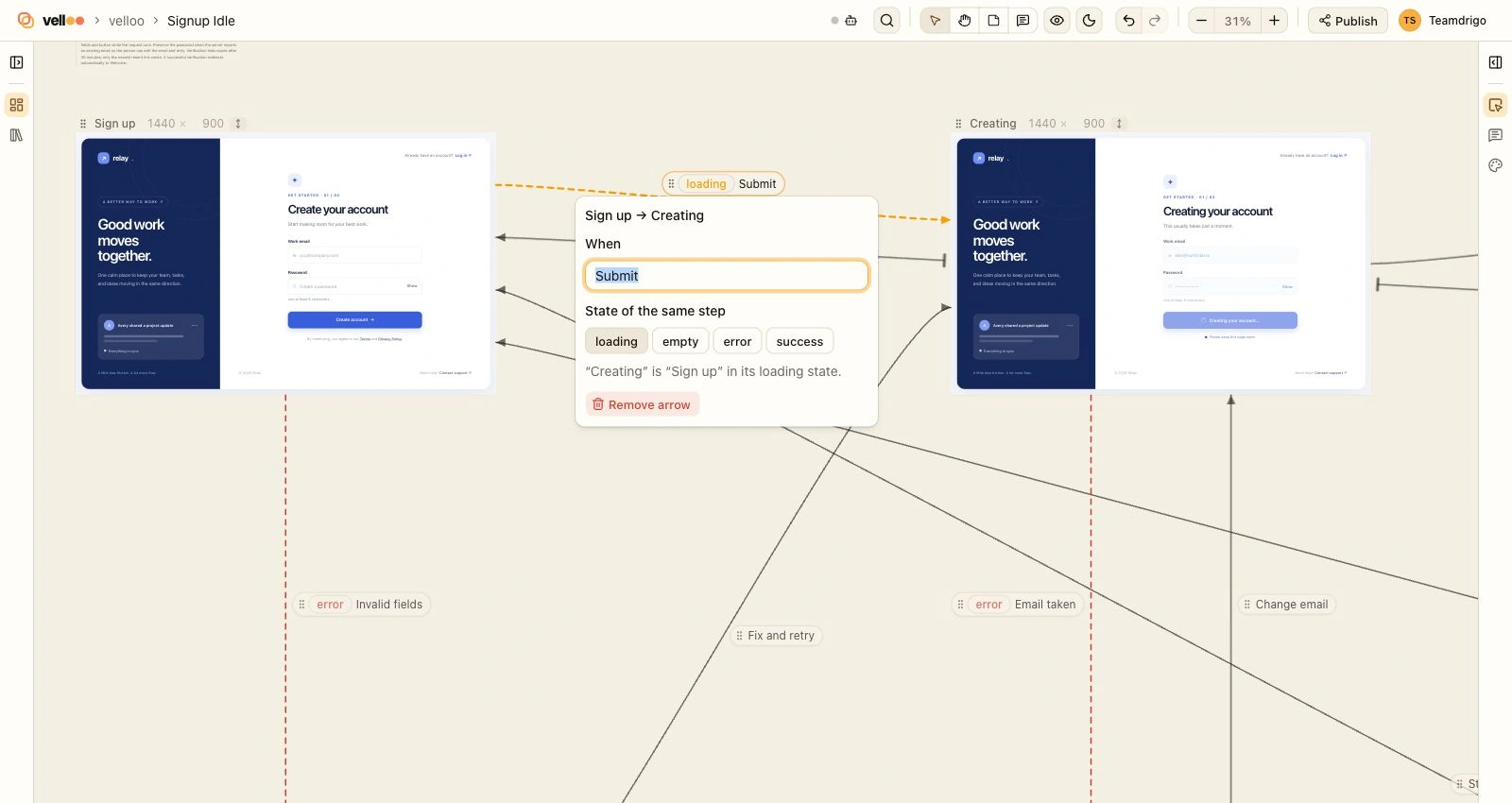
A transition is drawn solid. A state arrow is dashed and tinted. Arrows follow a frame while you drag it, keep their weight at any zoom, and are never drawn over a screen: an arrow that would cross another frame stops short of it and resumes on the far side.
Arrow edits undo like any other board edit. Removing a frame, or deleting its screen, removes the arrows that touched it.
The editor offers the four conventional states. It shows and clears a custom state, but you can’t type a new one there; ask your agent to set it. There is no keyboard way to draw an arrow yet.
How an agent draws one
connect_frames draws, edits, and erases arrows in one write. Each entry names the two frames; label is the trigger or condition, and state makes the arrow a state arrow:
{
  "tool": "connect_frames",
  "args": {
    "edges": [
      { "from": "signup-1", "to": "signup-sending-1", "state": "loading", "label": "Submit" },
      { "from": "signup-sending-1", "to": "signup-taken-1", "state": "error", "label": "Email already taken" },
      { "from": "signup-sending-1", "to": "verify-1", "label": "Account created" },
      { "from": "signup-taken-1", "to": "signup-1", "label": "Try again" }
    ]
  }
}
Send a pair again to change its label or state (null clears either), or with remove: true to erase it. States are built as screens first: clone the default with add_screen { fromScreenId }, change what differs, frame it beside the default, then join the two with a state arrow.
An arrow sent with a state that can only be a transition inside its step (a way back, a state its target already has, or default) is kept as a transition and listed in readAsTransitions. A real contradiction is refused: a second state for a frame that already is one, or a loop of states.
The result returns the board’s arrows and what the drawing still leaves open: gaps and unconnected. A flow drawn with no state at all also carries states, a one-line question: a step that waits on something usually shows a loading and an error screen, and a list an empty one. Arguments are in the lifecycle reference.
How an agent reads one
get_board carries flow whenever the board has arrows. mode: "flow" returns that alone:
{ "tool": "get_board", "args": { "boardId": "signup", "mode": "flow" } }{
"boardId": "signup",
"name": "Sign-up flow",
"steps": [
{
"frame": "signup-1",
"screen": "signup",
"name": "Sign up",
"route": "/signup",
"states": [
{ "state": "loading", "frame": "signup-sending-1", "screen": "signup-sending", "when": "Submit" },
{ "state": "error", "frame": "signup-taken-1", "screen": "signup-taken", "when": "Email already taken", "after": "signup-sending-1" }
]
},
{ "frame": "verify-1", "screen": "verify", "name": "Check your inbox" }
],
"transitions": [
{ "from": "signup-sending-1", "to": "verify-1", "when": "Account created" },
{ "from": "signup-taken-1", "to": "signup-1", "when": "Try again" }
],
"starts": ["signup-1"],
"ends": ["verify-1"],
"note": "A state is its step in another condition, not another page: build each step as one route and one component that shows its states conditionally. Only a transition changes the route."
}stepslists each step an arrow touches, in board order. A step is named by its default frame and carries thescreenthat frame shows, aname(the frame’s label, else the screen’s name), and aroutewhen the screen stands for an app path.statesare the step’s other frames, each with itsstate, itsscreen, andwhenit occurs.afternames the state’s frame it follows when that isn’t the default: here, the error comes after loading.transitionsare the arrows that move on, ends as drawn. One can leave a state’s frame.startsare the steps the flow is entered at. A way back doesn’t hide the start: steps that lead round to each other are read as one loop.endsare the frames nothing leaves, other than loading and error states. A flow can end at a state, and a frame you forgot to lead on from shows up here too.unconnectedlists frames no arrow touches, unless their screen is already in the flow at another size.gapslists what a step is missing.noteappears when any step has states. It reminds the reader that a state is built on its step’s one route and component.
Frame ids are what connect_frames takes, and every frame carries the screen id that emit_code takes.
The gap rule
There is one rule today: a step that has a loading state and no error state. A step that waits on something has to say what happens when the wait fails.
{ "gaps": [{ "step": "signup-1", "missing": "error", "why": "it has a loading state" }] }Every other missing state depends on what the step is. A welcome screen owes nobody an empty state, so those are left for you to judge from states. Treat a gap as a question to answer or a state to design, not something to cover up in code.
Arrows are a spec, not behaviour
Nothing runs on the canvas. Clicking a button in a frame does not follow its arrow, and a label is plain words, never a condition Velloo evaluates.
emit_code emits nothing for arrows. To implement a flow, your agent reads the board with get_board, emits each step’s and each state’s screen with emit_code, and writes the routing, requests, and state handling in your app’s own idiom: a route per step, and the step’s states inside that route’s component.
A state is its step in another condition, not another page. Only a transition changes the route. When any step has states, the flow read carries a note saying so, so an agent does not give the loading and error states a page each and navigate between them.
Sharing a flow
A published share draws the same arrows, read-only, so reviewers see the flow you see.
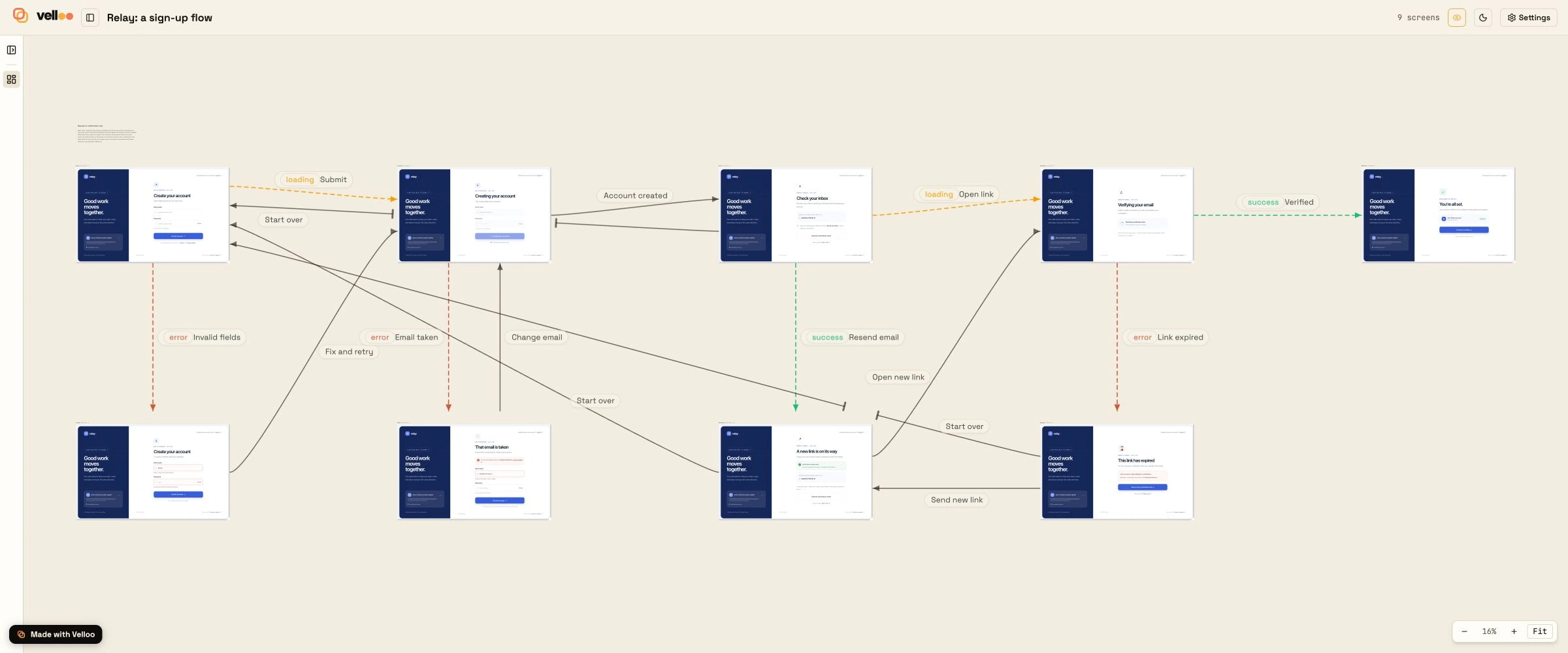
The arrows are stored with the board as an optional edges list in boards/<id>.json, described in The design folder. A board with no arrows has no such field.
Next
- The board, frame, and screen model the arrows sit on: Core concepts.
connect_framesin full: MCP lifecycle.- Turning each step into code: From design to code.